
Loading page
by embr
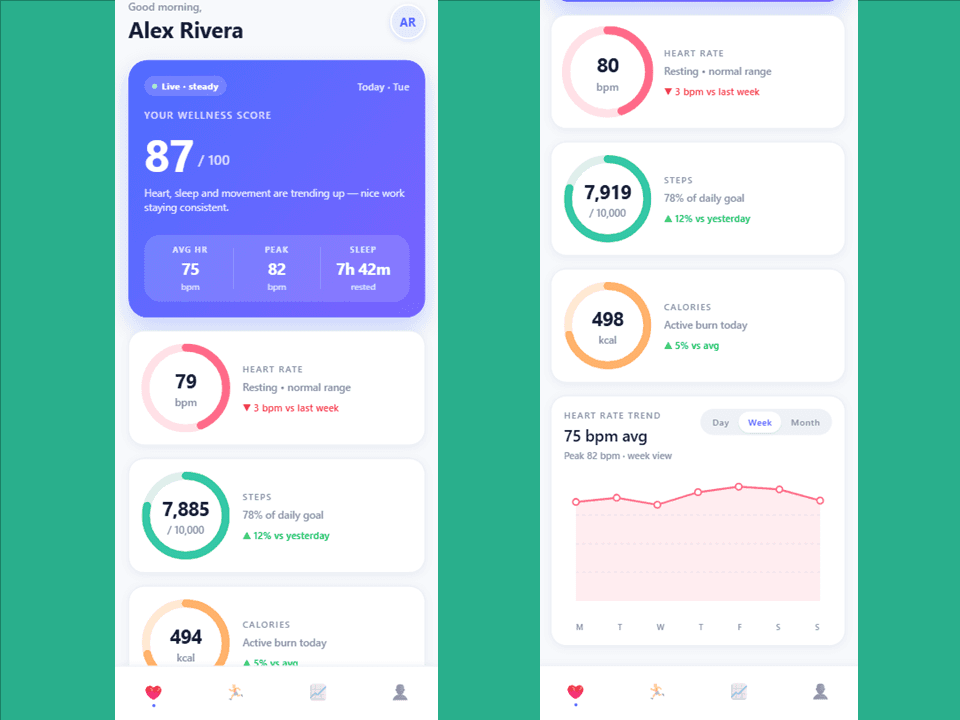
Expo-based health tracking dashboard with tab navigation, real-time metrics, and activity timelines. Features interactive heart rate charts with day/week/month views, workout logging, sleep tracking, and device sync status—all built with React Native and TypeScript. Perfect for fitness app developers needing a production-ready UI foundation with animated progress indicators and responsive layouts. Licensed under Tetrees License.
Mobile OL4O is a React Native health and fitness tracking dashboard built with Expo and TypeScript. It provides a comprehensive mobile interface for monitoring daily wellness metrics including heart rate, steps, calories, sleep, and workout activities. The app features a tab-based navigation system with real-time data updates, interactive charts, and detailed activity timelines.
npm install
# or
yarn install
# Start Expo development server
npx expo start

# Run on iOS simulator
npx expo run:ios

# Run on Android emulator
npx expo run:android

# Run on web
npx expo run:web
app/(tabs)/
  ├── _layout.tsx          # Tab navigation configuration
  ├── index.tsx            # Dashboard screen
  ├── activity.tsx         # Activity screen
  ├── trends.tsx           # Trends screen (referenced)
  └── profile.tsx          # Profile screen (referenced)

src/
  ├── components/          # Reusable UI components
  │   ├── CircularProgress.tsx
  │   ├── LineChart.tsx
  │   ├── ActivityTimeline.tsx
  │   ├── MetricCard.tsx
  │   ├── WorkoutCard.tsx
  │   └── DeviceSyncCard.tsx
  └── constants/
      └── theme.ts         # Colors, spacing, typography
TabLayout (_layout.tsx)
DashboardScreen (index.tsx)
setIntervalActivityScreen (activity.tsx)
Update theme colors and spacing in src/constants/theme.ts:
Colors.primary      // Primary brand color
Colors.heart        // Heart rate metric color
Colors.steps        // Steps metric color
Colors.calories     // Calories metric color
Colors.sleep        // Sleep metric color
Modify metric update frequency in DashboardScreen:
const id = setInterval(() => {
  // Update interval (currently 1800ms = 30 seconds)
}, 1800);
Tetrees License
Spin up an isolated sandbox and run it server-side — no local setup.
The sandbox audition completed and the detected runnable path passed.
This React, React Native mobile app completed archive review. Structure, dependency manifests, documentation, functional source, and common risk patterns were checked by the Tetrees verification pipeline; runtime phases are stated separately.
Deterministic AVCP artifact review
Pipeline avcp-2026-08-04.1 · SHA-256 891619a7661615fe…
This version-scoped review deterministically inspects the submitted archive for structure, dependencies, documentation, functional source, and common malicious or high-risk signals. Build and test phases are reported as passed only after an isolated sandbox audition. It is not a guarantee of perfect security.
Reviewed Aug 4, 2026
The full install guide and integration prompts unlock after purchase.
Push this product straight into your AI IDE, web builder or cloud IDE.
Connect Tetrees to a compatible AI IDE, list products you own, and request the verified ZIP without exposing seller upload controls.
9 ratings
Rock solid so far. Dropped this mobile template straight into the app; examples matched the actual API, which is rare. Support answered my question fast.
Dropped it into my stack and it just worked. Picked up "Health Tracker App Template" for a client app — Zero mystery dependencies, everything is documented. Docking half a star only because I wanted a couple more examples.
Great starting point. Dropped this mobile template straight into the app; examples matched the actual API, which is rare.
Shipped with this same week. Picked up this mobile template for a client app — Zero mystery dependencies, everything is documented.
Dropped it into my stack and it just worked. As someone who builds these all day, components are cleanly separated and easy to extend. Five stars, would recommend to my team.
Worth every point. No spaghetti — the folder layout is sane, and docs were clear enough that I never had to open an issue.
Punches well above its price. Picked up "Health Tracker App Template" for a client app — Zero mystery dependencies, everything is documented.
Dropped it into my stack and it just worked. Used "Health Tracker App Template" to build my app and it cut days off the build. Support answered my question fast.
Saved me a ton of time. Dropped this mobile template straight into the app; even the tricky env setup was explained well. Will definitely check their other products.
Sign in to join the discussion
Loading discussion…